
Finishing a Windows installation feels a bit like moving into a new apartment and discovering the landlord has thoughtfully provided… a single folding chair. No couch. No table. No silverware. Just one chair, placed in the center of the room like a performance art piece titled “Good luck.”
You can’t work yet.
You can’t create yet.
You can’t develop yet.
You can’t even open a PDF without Windows suggesting a browser you’ve spent years avoiding.
This is the core philosophical flaw in Windows Setup:
it installs a blueprint, not a system.
Linux figured this out ages ago.
Ubuntu Studio installs a studio.
Fedora Workstation installs a workstation.
Pop!_OS installs a developer environment — but let’s be honest, its main population is Windows refugees who just want their games to work without Windows gaslighting them about drivers.
Windows installs… Windows.
And then it hands you a scavenger hunt.
You spend the next two hours downloading tools, uninstalling bloat, toggling settings, and whispering “why is this still like this” into your coffee. It’s tradition, but not the good kind. More like a rite of passage designed by someone who hates you.
And here’s the absurd part: Windows already has the missing piece.
It’s called Chocolatey — the package manager that behaves like a responsible adult. It’s declarative, scriptable, dependency‑aware, and capable of installing almost everything you actually use. It’s apt‑get for Windows, except it doesn’t require you to understand the emotional landscape of Debian.
If Windows Setup were rebuilt around Chocolatey, the installer could finally behave like a modern OS installer instead of a polite shrug.
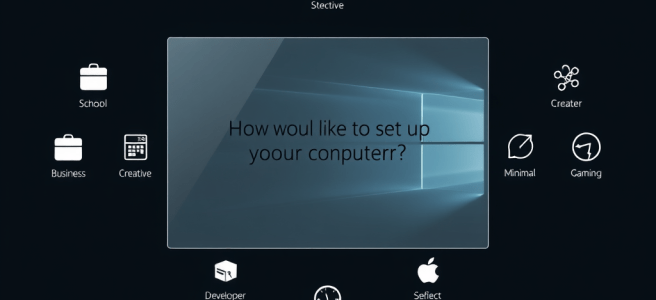
Picture this: you boot from USB into a dark, muted wallpaper — something calm, something that doesn’t scream “enterprise synergy.” A transparent terminal layer fades in. System checks roll by in soft ANSI colors like a DOS prompt that’s been through mindfulness training.
Then a single line appears:
How would you like to set up your computer.
That’s it.
No wizard.
No mascot.
No “Let’s get you connected to the cloud.”
Just a calm, monospace question.
Below it, a list of vibes:
- School
- Business
- Creative
- Developer
- Minimal
- Gaming
- Customize
Most people pick a vibe.
A few people pick Customize because they enjoy fdisk the way other people enjoy woodworking. Everyone gets a system that matches who they are.
And here’s the important part:
every vibe includes two universal questions:
“Do you have licenses.”
and
“Would you like to add gaming tools.”
Because licensing isn’t a business‑only concern, and gaming isn’t a SKU.
They’re both capabilities.
If you say yes to licenses, the installer gives you a quiet little text box — no drama, no Microsoft Account interrogation — where you can enter your Adobe, Office, JetBrains, Affinity, Steam, or other commercial suite keys right there during installation. The OS installs the licensed versions silently, like a system that respects your adulthood.
If you say yes to gaming tools, the installer asks:
“Which game libraries should I install.”
And presents:
- Steam
- Blizzard Battle.net
- GOG Galaxy
- Epic Games Launcher
- EA App
- Ubisoft Connect
- Itch.io
All optional.
All silent.
All available in any ISO.
Because a Creative user might also be a gamer.
A Business user might also be a gamer.
A Developer might also be a gamer.
A Minimal user might still want Steam.
A School user might want Minecraft.
Gaming is not an identity.
It’s a layer.
Then the installer asks the second question, which is pure computing lineage:
Where should I put it.
A list of disks appears.
And — this is the part that makes power users tear up — there’s an option to open fdisk right there. No shame. No warnings. No “Are you sure?” Just the tools, presented plainly, like a system that trusts you.
You pick the disk.
You hit Enter.
And then — this is the moment Windows has been missing for thirty years — the installer says:
“Before I build your system, let’s connect your cloud services.”
Not after boot.
Not after Settings.
Not after you remember you even have cloud drives.
Right here.
Right now.
You authenticate with:
- OneDrive
- Adobe Cloud
- Creative Cloud Libraries
- Dropbox
- Google Drive
- GitHub
- Steam
- Epic
- GOG
- Blizzard
- EA
- Ubisoft
- Whatever else you use
And the installer quietly wires everything together.
Your fonts.
Your brushes.
Your presets.
Your libraries.
Your sync folders.
Your cloud storage.
Your identity.
Backup doesn’t have to be “set up later.”
It’s already part of the system before the system exists.
This is what civilized computing looks like.
When the installation finishes, you don’t land in a blank room with a folding chair. You land in a usable environment. A system that’s ready. A system that matches your identity. A system that doesn’t require an afternoon of cleanup before you can do anything meaningful.
This isn’t a technical upgrade.
It’s a symbolic one.
It says:
- Windows knows who you are.
- Windows respects your time.
- Windows installs a system, not a skeleton.
- Windows is finally calm.
- Windows is finally intentional.
And all it took was acknowledging the competent intern in the corner and giving Chocolatey the promotion it deserves.
Because at the end of the day, the installer is the OS’s first impression. And Windows has spent thirty years opening the door and saying, “Welcome! Here’s a blueprint. The rest is your problem.”
It’s time for Windows to hand people a system instead.
Scored by Copilot. Conducted by Leslie Lanagan.


 Stories That Are All True
😊
LikeLike